R Using CRAN Packages
Step 1: Installing R Additional Package from CRAN
Section titled “Step 1: Installing R Additional Package from CRAN”To install R additional packages from CRAN, run below command in the SSH terminal (CLI), for tutorial in accessing CLI, please refer to SSH Shell Access to EdUHK HPC Platform and Cluster (Web-based Shell Access)
# Load R Environment Module$ module load R/4.3
# Start R CLI$ R
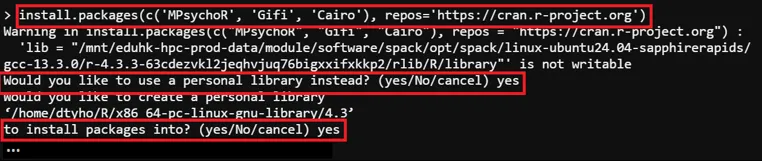
# Package Install Path:/home/$USER/R> install.packages(c('<packages to install>'), repos='<repository_url>')
# Install Package (Example)> install.packages(c('MPsychoR', 'Gifi', 'Cairo'), repos='https://cran.r-project.org')
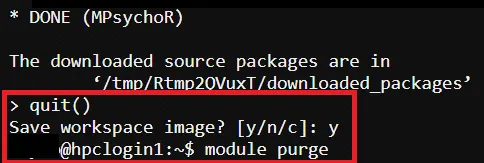
# Exit R CLI> quit()
# Purge Module$ module purge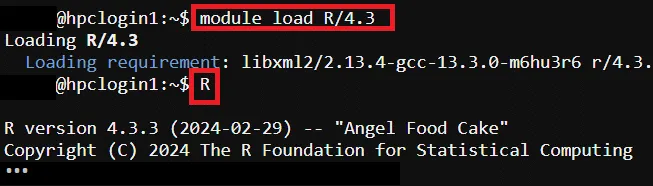
Step 2: Prepare R Program Source Code
Section titled “Step 2: Prepare R Program Source Code”For the example source code please refer to R Program Source Code (Example)
Step 3: Prepare Job Template Script
Section titled “Step 3: Prepare Job Template Script”Pre-configured template script path → /home/$USER/job_template/slurm_job/MPsychoR_test.sh
#!/bin/bash#SBATCH --job-name=MPsychoR_test ## Job Name#SBATCH --partition=shared_cpu ## Partition for Running Job#SBATCH --nodes=1 ## Number of Compute Node#SBATCH --ntasks-per-node=1 # Number of Task per Compute Node#SBATCH --cpus-per-task=2 ## Number of CPU per task#SBATCH --time=60:00 ## Job Time Limit (i.e. 60 Minutes)#SBATCH --mem=10GB ## Total Memory for Job#SBATCH --output=./%x%j.out ## Output File Path#SBATCH --error=./%x%j.err ## Error Log Path
## Initiate Environment Modulesource /usr/share/modules/init/profile.sh
## Reset the Environment Module componentsmodule purge
## Load Modulemodule load R/4.3
## Run user commandRscript /home/${USER}/job_template/R/MPsychoR_test.R
## Clear Environment Module componentsmodule purge
Step 4: Submit HPC Job
Section titled “Step 4: Submit HPC Job”Guides for submitting HPC job, please refer to: HPC Job Submission (For CLI) and HPC Job Submission (For Web Portal)
Step 5: Reset user’s R Environment (Optional)
Section titled “Step 5: Reset user’s R Environment (Optional)”# Reset User’s R Environment$ rm -rf /home/$USER/R