How to Apply EdUHK HPC Account?
HPC Account Application
Section titled “HPC Account Application”Accessing EdUHK HPC resources by end-user require EdUHK HPC Account, the notes of the account application as below:
- Access to the high-performance computing (HPC) resources at the University is restricted to staff and students affiliated with a designated research group
- EdUHK academic staff members could apply for a Research Group Account
- Research Group Account owners have the option to delegate a Research Group Manager, who will be responsible for managing the HPC users of the group
- Research Group Account owners and/or Research Group Manager could apply for/revoke HPC user accounts for the Research Group
- Hardware owned by individual researchers/research projects and joined to the condominium model are allocated with their dedicated Resource Partition.
- Resource Partition owners have the privilege of running jobs on their hardware with priority, and can grant such privilege to other HPC users.
- Applicant should liaise with the Resource Partition owner before submitting this form. Endorsement from the Resource Partition owner is required for completing application for HPC special resources.
Application Forms
Section titled “Application Forms”OCIO provided below application forms for HPC account/resources request:
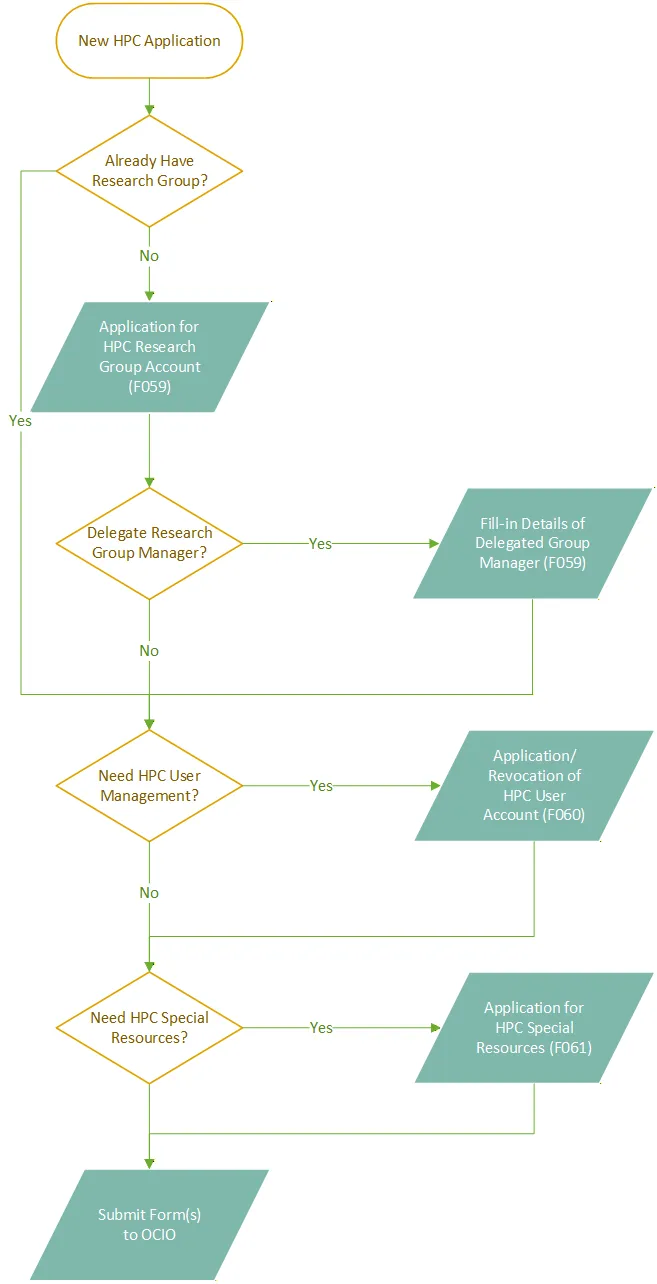
- Application for HPC Research Group Account (F059)
- Create New Research Group
- Delegate Research Group Manager (Optional)
- Application/Revocation of HPC User Account (F060)
- Create New HPC User
- Remove HPC User
- Application for HPC Special Resources (F061)
- Request HPC Special Resources
The completed form should be returned to OCIO via internal mail, email or fax. Please contact HPC team at hpc-ocio@eduhk.hk for enquiries.
HPC Account Application Flow Chat
Section titled “HPC Account Application Flow Chat”