OpenMPI (General)
Step 1: Initiate User’s SSH Key
Section titled “Step 1: Initiate User’s SSH Key”To initiate user’s SSH key, run below command in the SSH terminal (CLI), for tutorial in accessing CLI, please refer to SSH Shell Access to EdUHK HPC Platform and Cluster (Web-based Shell Access)
# Run init-ssh-key$ init-ssh-key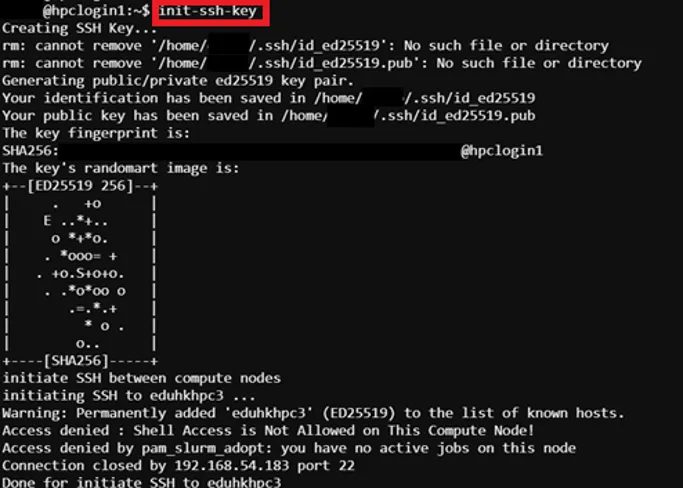
The output Access denied… is normal, we only need adding host to known host list
Step 2: Prepare MPI Program Source Code
Section titled “Step 2: Prepare MPI Program Source Code”For the example source code please refer to MPI Program Source Code (Example)
Step 3: Prepare Job Template Script
Section titled “Step 3: Prepare Job Template Script”Pre-configured template script path → /home/$USER/job_template/slurm_job/mpi_pi.sh
#!/bin/bash#SBATCH --job-name=mpi_pi ## Job Name#SBATCH --partition=shared_cpu ## Partition for Running Job#SBATCH --nodes=2 ## Number of Compute Node#SBATCH --ntasks=2 # Number of Tasks#SBATCH --cpus-per-task=2 ## Number of CPU per task#SBATCH --time=60:00 ## Job Time Limit (i.e. 60 Minutes)#SBATCH --mem=10GB ## Total Memory for Job#SBATCH --output=./%x%j.out ## Output File Path#SBATCH --error=./%x%j.err ## Error Log Path
## Initiate Environment Modulesource /usr/share/modules/init/profile.sh
## Reset the Environment Module componentsmodule purge
## Load Modulemodule load openmpi/5.0
# Generate a hostfile with unique hostnamessrun hostname -s | sort | uniq > hostfile.${SLURM_JOB_ID}
## Run user commandmpicc -o ./pi /home/${USER}/job_template/C/mpi_pi.cmpirun -np 4 --hostfile hostfile.${SLURM_JOB_ID} ./pi
# Clean uprm hostfile.$SLURM_JOB_IDrm pi
## Clear Environment Module componentsmodule purge
Step 3: Submit HPC Job
Section titled “Step 3: Submit HPC Job”Guides for submitting HPC job, please refer to: HPC Job Submission (For CLI) and HPC Job Submission (For Web Portal)