Ollama (Self-Install)
Ollama is an open-source platform that enables users to run advanced large language models—such as Llama 3, Mistral, Gemma, and Phi-3—directly on local hardware.
It offers a straightforward command-line interface for downloading, installing, and interacting with these models in a completely offline, privacy-focused, and cost-free environment.
Download and Install Ollama
Section titled “Download and Install Ollama”To install Ollama, run below command in the SSH terminal (CLI), for tutorial in accessing CLI, please refer to SSH Shell Access to EdUHK HPC Platform and Cluster (Web-based Shell Access)
# Create a folder for Ollama installation$ mkdir ${HOME}/ollama$ cd ${HOME}/ollama
# Download and extract Ollama Linux package$ wget https://ollama.com/download/ollama-linux-amd64.tgz$ tar -xvf ollama-linux-amd64.tgz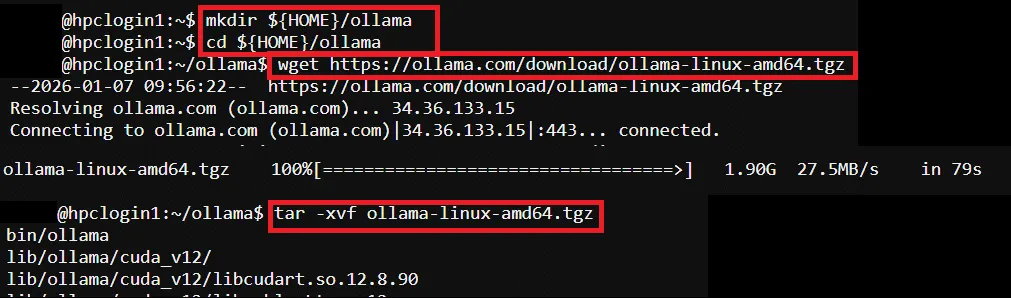
Prompt AI Model: Prepare SLURM Job Script
Section titled “Prompt AI Model: Prepare SLURM Job Script”Pre-configured template path → /home/$USER/job_template/run_ollama.sh
#!/bin/bash#SBATCH --job-name=run_ollama ## Job Name#SBATCH --partition=shared_gpu_l40 ## Partition for Running Job#SBATCH --nodes=1 ## Number of Compute Node#SBATCH --ntasks=1 # Number of Tasks#SBATCH --cpus-per-task=8 ## Number of CPU per task#SBATCH --time=00:60:00 ## Job Time Limit (i.e. 60 Minutes)#SBATCH --gres=gpu:l40:1 # Number of GPUs (i.e. 1 x l40 GPU)#SBATCH --mem=40GB ## Total Memory for Job#SBATCH --output=./%x_%j.out ## Output File Path#SBATCH --error=./%x_%j.err ## Error Log Path
## Initiate Environment Modulesource /usr/share/modules/init/profile.sh
## Reset the Environment Module componentsmodule purge
## Load Required Modulemodule load cuda/12.6
## Setup Environment Variable For Ollamaexport OLLAMA_HOME_PATH=${HOME}/ollamaexport PATH=${PATH}:${OLLAMA_HOME_PATH}/bin
# Start Ollama serviceollama serve &
# Wait for server startupsleep 10
## Run the model (change to your preferred AI model, and write your prompt)## Example: Run llama3.1:8B and prompt "How to make a pizza?"ollama run llama3.1:8b "How to make a pizza?"
# Kill Ollama servicepkill ollama
## Clear Environment Module Componentsmodule purge
Prompt AI Model: Submit HPC Job
Section titled “Prompt AI Model: Submit HPC Job”Guides for submitting HPC job, please refer to: HPC Job Submission (For CLI) and HPC Job Submission (For Web Portal)
Remove AI Model Images Download by Ollama (Optional)
Section titled “Remove AI Model Images Download by Ollama (Optional)”During the first time of running an AI model by Ollama, the model image will be downloaded in HPC user’s environment.
To remove or clean up the downloaded model images, modify the ollama command in the Job Script and submit the job again.
Example Job Script (Modified form pre-configured template):
#!/bin/bash#SBATCH --job-name=run_ollama ## Job Name#SBATCH --partition=shared_gpu_l40 ## Partition for Running Job#SBATCH --nodes=1 ## Number of Compute Node#SBATCH --ntasks=1 # Number of Tasks#SBATCH --cpus-per-task=8 ## Number of CPU per task#SBATCH --time=00:60:00 ## Job Time Limit (i.e. 60 Minutes)#SBATCH --gres=gpu:l40:1 # Number of GPUs (i.e. 1 x l40 GPU)#SBATCH --mem=40GB ## Total Memory for Job#SBATCH --output=./%x_%j.out ## Output File Path#SBATCH --error=./%x_%j.err ## Error Log Path
## Initiate Environment Modulesource /usr/share/modules/init/profile.sh
## Reset the Environment Module componentsmodule purge
## Load Required Modulemodule load cuda/12.6
## Setup Environment Variable For Ollamaexport OLLAMA_HOME_PATH=${HOME}/ollamaexport PATH=${PATH}:${OLLAMA_HOME_PATH}/bin
# Start Ollama serviceollama serve &
# Wait for server startupsleep 10
## Remove model image## Example: Remove llama3.1:8Bollama rm llama3.1:8b
# Kill Ollama servicepkill ollama
## Clear Environment Module Componentsmodule purge