OpenMPI (General)
Step 1: Initiate User’s SSH Key
Section titled “Step 1: Initiate User’s SSH Key”To initiate user’s SSH key, run below command in the SSH terminal (CLI), for tutorial in accessing CLI, please refer to Shell Access and Useful Command
# Run init-ssh-key$ init-ssh-key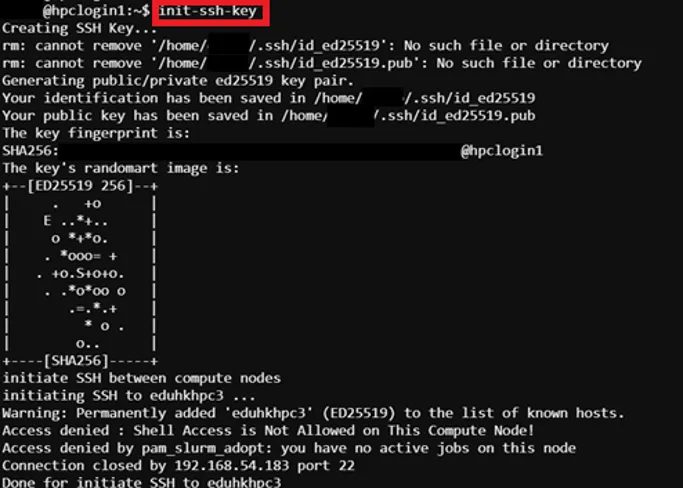
The output “Access denied…” is normal, we only need adding host to known host list
Step 2: Prepare MPI Program Source Code
Section titled “Step 2: Prepare MPI Program Source Code”Example source code path /home/$USER/job_template/C/mpi_pi.c
// This program is to caculate PI using MPI// The algorithm is based on integral representation of PI. If f(x)=4/(1+x^2), then PI is the intergral of f(x) from 0 to 1
#include <stdio.h>#include <mpi.h>
#define N 1E9#define d 1E-9#define d2 1E-18
int main (int argc, char* argv[]){  int rank, size, error, i;
  double pi=0.0, result=0.0, sum=0.0, begin=0.0, end=0.0, x2;
  error=MPI_Init (&argc, &argv);
  //Get process ID  MPI_Comm_rank (MPI_COMM_WORLD, &rank);
  //Get processes Number  MPI_Comm_size (MPI_COMM_WORLD, &size);
  //Synchronize all processes and get the begin time  MPI_Barrier(MPI_COMM_WORLD);  begin = MPI_Wtime();
  //Each process will caculate a part of the sum  for (i=rank; i<N; i+=size)  {    x2=d2*i*i;    result+=1.0/(1.0+x2);  }
  //Sum up all results  MPI_Reduce(&result, &sum, 1, MPI_DOUBLE, MPI_SUM, 0, MPI_COMM_WORLD);
//Synchronize all processes and get the end time  MPI_Barrier(MPI_COMM_WORLD);  end = MPI_Wtime();
  //Caculate and print PI  if (rank==0)  {    pi=4*d*sum;    printf("np=%2d;    Time=%fs;    PI=%lf\n", size, end-begin, pi);  }
  error=MPI_Finalize();  return 0;}
Step 3: Prepare Job Template Script
Section titled “Step 3: Prepare Job Template Script”Pre-configured template script path -> /home/$USER/job_template/slurm_job/mpi_pi.sh
#!/bin/bash#SBATCH --job-name=mpi_pi ## Job Name#SBATCH --partition=shared_cpu ## Partition for Running Job#SBATCH --nodes=2 ## Number of Compute Node#SBATCH --ntasks=2 # Number of Tasks#SBATCH --cpus-per-task=2 ## Number of CPU per task#SBATCH --time=60:00 ## Job Time Limit (i.e. 60 Minutes)#SBATCH --mem=10GB ## Total Memory for Job#SBATCH --output=./%x%j.out ## Output File Path#SBATCH --error=./%x%j.err ## Error Log Path
## Initiate Environment Modulesource /usr/share/modules/init/profile.sh
## Reset the Environment Module componentsmodule purge
## Load Modulemodule load openmpi/5.0
# Generate a hostfile with unique hostnamessrun hostname -s | sort | uniq > hostfile.${SLURM_JOB_ID}
## Run user commandmpicc -o ./pi /home/${USER}/job_template/C/mpi_pi.cmpirun -np 4 --hostfile hostfile.${SLURM_JOB_ID} ./pi
# Clean uprm hostfile.$SLURM_JOB_IDrm pi
## Clear Environment Module componentsmodule purge
Step 4: Create Template (Web Interface Feature)
Section titled “Step 4: Create Template (Web Interface Feature)”To submit HPC via web interface a job template is required, details please refer to: Create Template (Web Interface Feature)
For Job submission via CLI Terminal, please skip this step.
Step 5: Submit HPC Job
Section titled “Step 5: Submit HPC Job”Guides for submitting HPC job, please refer to: HPC Job Submission