Shell Access and Useful Command
Permissions
Section titled “Permissions”User Permission: Normal Unix User
Caution: Root and “sudo” are not allowed
Folders where user could write (Default):
- -> Home
- -> Scratch
- -> Project Group Share Folder
Cluster (Web-based Shell Access)
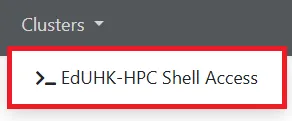
Section titled “Cluster (Web-based Shell Access)”Clusters is a portal built in SSH client to connect HPC server’ terminal (CLI) (Login Node only)
- Click “EDUHK-HPC Shell Access”
- Type “yes” then enter (for first time access only)
- Input SSH password (EdUHK-user-password) to have shell access
Shell Access via SSH
Section titled “Shell Access via SSH”Please refer to How to Login to EdUHK HPC Platform?
How to check Slurm partitions status on HPC platform?
Section titled “How to check Slurm partitions status on HPC platform?”To check Slurm partitions status (only shows user attached partitions), run below command in the SSH terminal (CLI)
$ sinfoHow to check current available resources on HPC platform?
Section titled “How to check current available resources on HPC platform?”To check current available resources in cluster, run below command in the SSH terminal (CLI)
$ resource-avail