CUDA Program Using Sinularity Environment
Step 1: Create Singularity Image (CUDA)
Section titled “Step 1: Create Singularity Image (CUDA)”To create SIngularity image (CUDA), run below command in the SSH terminal (CLI), for tutorial in accessing CLI, please refer to Shell Access and Useful Command
# Create new directory (if needed)$ mkdir /home/${USER}/singularity_image
# Pull docker image by singularity$ cd /home/${USER}/singularity_image$ module load singularity$ singularity pull docker://nvidia/cuda:12.8.0-devel-ubuntu24.04
# List pull image# (Example:cuda_12.8.0-devel-ubuntu24.04.sif)$ ls –al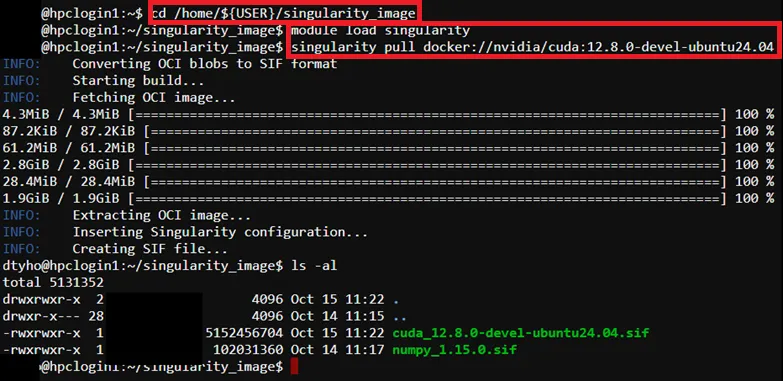
Step 2: Prepare CUDA Program Source Code
Section titled “Step 2: Prepare CUDA Program Source Code”Example source code path -> /home/$USER/job_template/C/cuda_pi.cu
#include <stdio.h>#include <cuda_runtime.h>
#define N 1000000000 // 1E9#define d 1E-9#define d2 1E-18
// Macro for CUDA error checking#define CUDA_CHECK(call) \  do { \    cudaError_t err = call; \    if (err != cudaSuccess) { \      fprintf(stderr, "CUDA error in %s:%d: %s\n", __FILE__, __LINE__, cudaGetErrorString(err)); \      exit(1); \    } \  } while (0)
// CUDA kernel to compute partial sums__global__ void compute_pi(double *sum, int n, int offset) {  int idx = blockIdx.x * blockDim.x + threadIdx.x;  int global_idx = idx + offset;  double x2;
  if (global_idx < n) {    x2 = d2 * global_idx * global_idx;    sum[idx] = 1.0 / (1.0 + x2);  }}
int main() {  int deviceCount;  CUDA_CHECK(cudaGetDeviceCount(&deviceCount));  if (deviceCount == 0) {    printf("No CUDA devices found!\n");    return 1;  }  printf("Found %d CUDA device(s)\n", deviceCount);
  double pi = 0.0, total_sum = 0.0;  cudaEvent_t start, stop;  float total_seconds = 0.0f;
  // Allocate host memory for sums  double *h_sums = (double*)malloc(N * sizeof(double));  if (!h_sums) {    fprintf(stderr, "Host memory allocation failed\n");    return 1;  }
  // Create CUDA events for global timing  CUDA_CHECK(cudaEventCreate(&start));  CUDA_CHECK(cudaEventCreate(&stop));  // Record start time (use default device for global timing)  CUDA_CHECK(cudaSetDevice(0));  CUDA_CHECK(cudaEventRecord(start));
  // Calculate workload per GPU  int base_workload = N / deviceCount;  int remainder = N % deviceCount;  int offset = 0;
  // Process each GPU  for (int dev = 0; dev < deviceCount; dev++) {    CUDA_CHECK(cudaSetDevice(dev));    CUDA_CHECK(cudaDeviceSynchronize()); // Ensure device is ready
    // Calculate workload for this GPU    int workload = base_workload + (dev < remainder ? 1 : 0);    if (workload == 0) continue;
    float gpu_milliseconds = 0.0f;    cudaEvent_t gpu_start, gpu_stop;
    // Create events on the current device    CUDA_CHECK(cudaEventCreate(&gpu_start));    CUDA_CHECK(cudaEventCreate(&gpu_stop));
    // Record GPU start time    CUDA_CHECK(cudaEventRecord(gpu_start));
    // Allocate device memory    double *d_sum;    CUDA_CHECK(cudaMalloc(&d_sum, workload * sizeof(double)));
    // Set up grid and block dimensions    int threadsPerBlock = 256;    int blocks = (workload + threadsPerBlock - 1) / threadsPerBlock;
    // Launch kernel    compute_pi<<<blocks, threadsPerBlock>>>(d_sum, N, offset);    CUDA_CHECK(cudaGetLastError());
    // Copy results back to host    CUDA_CHECK(cudaMemcpy(&h_sums[offset], d_sum, workload * sizeof(double), cudaMemcpyDeviceToHost));
    // Record GPU end time    CUDA_CHECK(cudaEventRecord(gpu_stop));    CUDA_CHECK(cudaEventSynchronize(gpu_stop)); // Ensure GPU work is complete    CUDA_CHECK(cudaEventElapsedTime(&gpu_milliseconds, gpu_start, gpu_stop));
    // Convert milliseconds to seconds for this GPU    float gpu_seconds = gpu_milliseconds / 1000.0f;    printf("GPU %d: Time=%f seconds, Workload=%d\n", dev, gpu_seconds, workload);
    // Update offset and accumulate time    offset += workload;    total_seconds += gpu_seconds;
    // Clean up device resources    CUDA_CHECK(cudaFree(d_sum));    CUDA_CHECK(cudaEventDestroy(gpu_start));    CUDA_CHECK(cudaEventDestroy(gpu_stop));
    // Synchronize device before switching    CUDA_CHECK(cudaDeviceSynchronize());  }
  // Sum results on host  for (int i = 0; i < N; i++) {    total_sum += h_sums[i];  }
  // Record end time on default device  CUDA_CHECK(cudaSetDevice(0));  CUDA_CHECK(cudaEventRecord(stop));  CUDA_CHECK(cudaEventSynchronize(stop));  float event_milliseconds;  CUDA_CHECK(cudaEventElapsedTime(&event_milliseconds, start, stop));  float event_seconds = event_milliseconds / 1000.0f;
  // Calculate and print PI  pi = 4 * d * total_sum;  printf("Total Time (sum of GPU times)=%f seconds; Event-based Time=%f seconds; PI=%lf\n",    total_seconds, event_seconds, pi);
  // Clean up  free(h_sums);  CUDA_CHECK(cudaEventDestroy(start));  CUDA_CHECK(cudaEventDestroy(stop));
  return 0;
Step 3: Prepare job template script
Section titled “Step 3: Prepare job template script”Pre-configured template script path -> /home/$USER/job_template/slurm_job/cuda_singularity.sh
#!/bin/bash#SBATCH --job-name=cuda_singularity ## Job Name#SBATCH --partition=shared_gpu_l40 ## Partition for Running Job#SBATCH --nodes=1 ## Number of Compute Node#SBATCH --ntasks=1 # Number of Tasks#SBATCH --cpus-per-task=2 ## Number of CPU per task#SBATCH --time=60:00 ## Job Time Limit (i.e. 60 Minutes)#SBATCH --gres=gpu:l40:1 # Number of GPUs per node (i.e. 1 x l40 GPU)#SBATCH --mem=10GB ## Total Memory for Job#SBATCH --output=./%x%j.out ## Output File Path#SBATCH --error=./%x%j.err ## Error Log Path
## Initiate Environment Modulesource /usr/share/modules/init/profile.sh
## Reset the Environment Module componentsmodule purge
## Load Modulemodule load singularity
## Run user commandsingularity run --nv \--bind /home/${USER}/job_template/C \/home/${USER}/singularity_image/cuda_12.8.0-devel-ubuntu24.04.sif \nvcc -o pi_cuda /home/${USER}/job_template/C/cuda_pi.cu && \./pi_cuda
## Clean uprm pi_cuda
## Clear Environment Module componentsmodule purge
Step 4: Create Template (Web Interface Feature)
Section titled “Step 4: Create Template (Web Interface Feature)”To submit HPC via web interface a job template is required, details please refer to: Create Template (Web Interface Feature)
For Job submission via CLI Terminal, please skip this step.
Step 5: Submit HPC Job
Section titled “Step 5: Submit HPC Job”Guides for submitting HPC job, please refer to: HPC Job Submission
Step 6: Remove Singularity Image (Optional)
Section titled “Step 6: Remove Singularity Image (Optional)”$ rm /home/${USER}/singularity_image/<image file>.sif