Policy For Files Storage
Home
- Personal storage for user installs customized environment (i.e. created by anaconda or via pip install)
- Quota: 500 GB per user (shared with Scratch and Project Group Share Folder personal limit)
- No auto clean-up policy
- Only owner has access right to this folder
Scratch
- Personal temporary storage for user upload script, program, generated job results by HPC jobs
- Quota: 500 GB per user (shared with Home and Project Group Share Folder personal limit)
- Auto clean-up files that last modification day older than 30 days, all non-empty sub-directory will not be clean-up while which is older than retention limit
- Only owner has access to this folder
Project Group Share Folder
- Group temporary storage for user share files within the project group
- All users in same project will be assigned as same group
- Share folder name for a project group defined as: “<Project Supervisor User ID>_<Project Name>” Example: hmchan_abc_project_01
- Quota: Each independent group member has 500GB personal quota limit (shared with Scratch and Home)
- No auto clean-up policy
- All members in same research group have access to group folder under this directory
How to check current storage usage and quota?
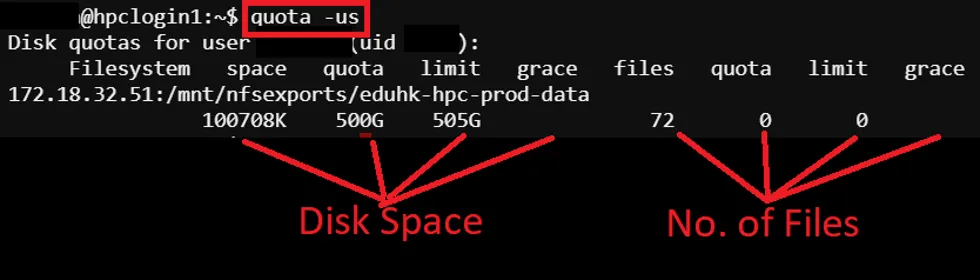
Section titled “How to check current storage usage and quota?”To check current storage usage and quota, run below command in the SSH terminal (CLI), for tutorial in accessing CLI, please refer to Shell Access and Useful Command
$ quota -us